Plans, trials and billing
What Free, Pro and Team include, how the free trial works, and how to upgrade, change your card or cancel.
The plans
A plan belongs to a workspace and covers everyone in it.
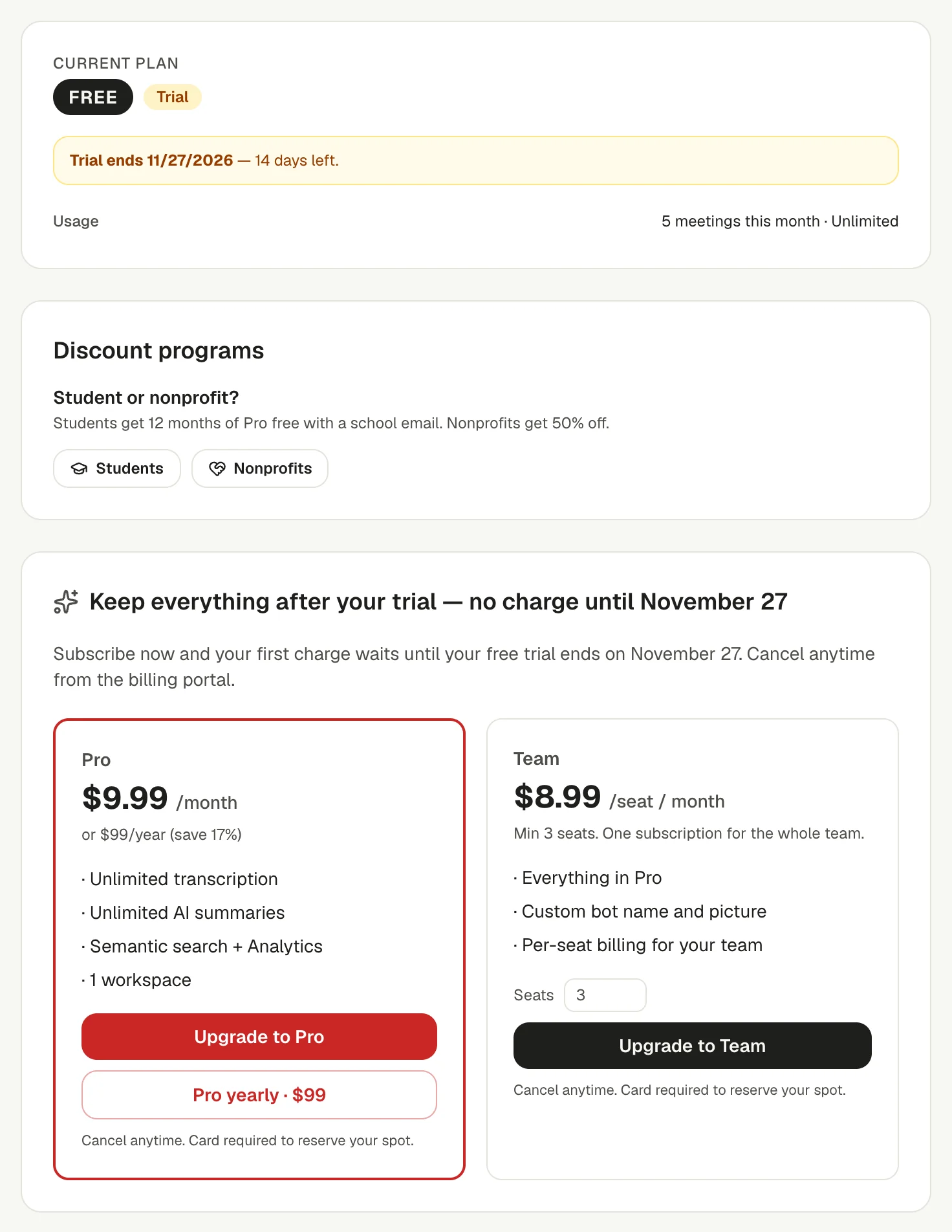
- Free, $0: 3 meetings a month and one workspace. Notes, action items, Ask Kolasys, search, share links and imports are all included.
- Pro, $9.99 a month or $99 a year: unlimited meetings, plus Analytics and the live transcript while you record in the desktop app.
- Team, $8.99 per seat a month, at least 3 seats, billed monthly: everything in Pro, plus a custom name and picture for the meeting bot.
The full comparison is on the Pricing page. Students and nonprofits pay less: see Student and nonprofit discounts.
The free trial
A new workspace starts with a 14-day free trial with no meeting limit and the Pro features. You don’t need a card. The sidebar shows how many days are left, and when it ends the workspace moves to Free unless you’ve subscribed. Your meetings stay either way.
Subscribing is a separate step, and a card is required. What you pay first depends on where you are:
- Still in the free trial: your first charge waits until the trial ends.
- Never subscribed before: 14 days with no charge, then the plan’s price.
- Subscribed to this workspace before: you’re charged when you subscribe.
The Billing page says which applies to you before you go to checkout.
Upgrade
Only workspace owners and admins can upgrade, change seats or the payment card, or cancel. Members can open the Billing page to see the plan, but its buttons are greyed out.
- Go to Settings › Billing, or click Upgrade at the bottom of the sidebar.
- Under Pro, click Try Pro free for 14 days (or Upgrade to Pro) for monthly, or Pro yearly · $99. For Team, set the number of Seats (3 or more) and click the Team button.
- Enter your card at checkout. You come back to Kolasys when it’s done.
Change your card or cancel
On Settings › Billing, click Manage subscription. It opens the billing portal, where you can update your payment method or cancel.
If you cancel, your plan stays active to the end of the period you’ve paid for. Then the workspace moves to Free and keeps all its meetings; the 3-meetings-a-month limit applies from then on.
If a payment fails
Billing shows Payment failed and the date your paid plan lasts until, 7 days after the failed payment. Click Update payment method before then. If it still isn’t paid by that date, the workspace is held to the Free plan’s meeting limit until the payment goes through.
On iPhone and Android
The phone apps don’t sell plans. Upgrade, change or cancel on the web, at app.kolasys.ai. Your plan applies in every app.
Was this helpful?
Still need help?
Email hi@kolasys.ai from the address on your account and we’ll reply by email.